In this story
Suppose the AI investment boom ends badly. Funding dries up, some model providers disappear, and the companies that survive have to charge enough to cover their costs. The wildest promises stop attracting money.
Even then, the software industry wouldn’t go back to how it was. The tools would still be around. Familiar work would need fewer people, more software would compete for the same customers, and people would expect a lot more from a small team.
To think this through, we’ll assume the surviving tools keep each person about four times as productive on the work we’re considering. That’s a scenario, not a measurement, and we explain it below.
 6:29Prefer watching a video instead?Watch "The AI Bubble Could Burst. Software Work May Not Go Back." on YouTube. (opens in a new tab)
The capability can outlive the company
An AI service is really several things: the model weights, the servers that run them, a product, tools, and a company paying to keep it all running. Those parts don’t all fail together.
A hosted AI service can shut down. Its pricing can change overnight, and a particular proprietary model can disappear.
In a funding crunch, the risk is highest for frontier-model companies that combine large compute commitments in pursuit of artificial general intelligence (AGI) (opens in a new tab) with high cash burn and a need for fresh funding. If the money runs out before revenue can cover those commitments, a provider may have to raise prices, cut services, or close. How exposed each company is depends on its cash, its flexibility, and who’s backing it.
Even if a provider goes under, its models don’t have to disappear with it. Someone could buy them and keep selling access without paying to train the next frontier model. Subscriptions could survive that way, as long as the price covers the cost of running them.
Open model weights are another way the tools survive. The Qwen3-Coder release (opens in a new tab), for example, made a coding model available with downloadable weights, and projects like llama.cpp (opens in a new tab) let you run supported models on your own hardware or servers.
Self-hosting isn’t free. You pay for hardware, memory, electricity, setup, and sometimes licensing. A downloadable model may not match the best hosted service, and a big model needs serious infrastructure.
But the real question is whether a model helps with the job in front of you: writing an importer, migrating a library, explaining unfamiliar code, or building a test harness. A model doesn’t have to be the best in the world to make a useful task much cheaper.
What people learn sticks around too. A team that has learned to work with clear specs, automated checks, and agents keeps that way of working. It can switch providers and keep most of what it knows.
Fourfold productivity is the working assumption
For this outlook, we assume that effective software output per person stays, on average, four times its pre-LLM-AI level across the work we’re considering, even after a bust. Individual gains will vary a lot.
By effective output, we mean useful work delivered to the same standard, counting the time spent reviewing, integrating, and fixing it. Generating four times as much code doesn’t count on its own.
Earlier coding assistants already showed measurable productivity gains (opens in a new tab). Locally hosted models (opens in a new tab) let you keep useful assistance without relying entirely on frontier services. How much you actually gain depends on the task, the hardware, and how much checking the work needs.
Frontier models could push productivity, and disruption, well beyond 4×.
Gains won’t be even. One person doubles their output, another gets ten times as much done, and someone who was already producing ten times a common baseline ends up at a hundred times that baseline. That last case is an existing advantage multiplied by a further gain. It doesn’t mean everyone becomes a hundred times faster.
Reading the multipliers
Same time and standard, different output
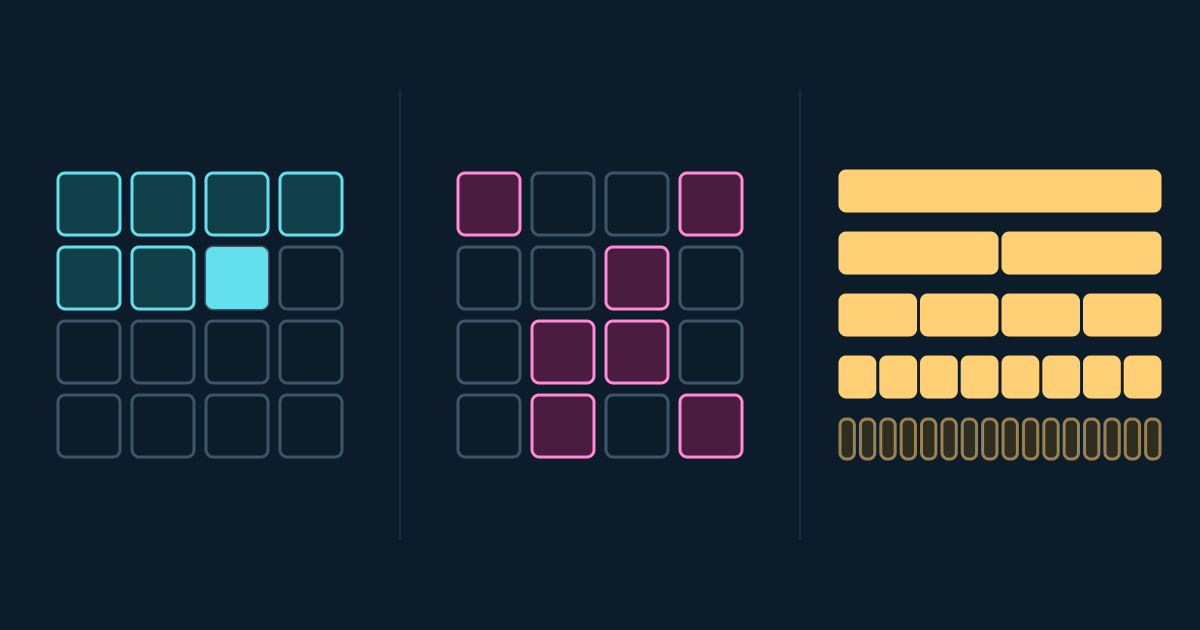
One blue square = one baseline unit of useful work.
Every grid has 100 spaces and uses the same scale.
1 unit of useful work
2 units of useful work
4 units of useful work
10 units of useful work
50 units of useful work
100 units of useful work
Which baseline does “100×” refer to?
vs. common baseline
vs. own output
vs. common baseline
This person improved their own output tenfold. The hundredfold comparison uses the common baseline.
To find the real multiplier, measure the work that actually gets accepted, the time it takes, and the bugs or support work it creates. If review eats the time you saved, the multiplier is lower. If one person can finish several valuable projects that used to need a team, it can be much higher.
Demand has to grow fast enough
Take an illustrative team of 100 people and give it the same amount of work it does today. If each person’s effective output rises to four times the baseline and stays there, a simple capacity model says that workload needs 25 people.
Double the demand and it needs 50. Quadruple it and you’re back at 100.
Explore the assumption
Can demand absorb the extra capacity?
Start with work requiring 100 people. Change effective productivity and the amount of work buyers want.
75% less capacity is required for this workload.
100 × 1 (demand) ÷ 4 (productivity) = 25
Illustrative capacity model, not an employment forecast. Assumes comparable quality, a sustained multiplier across the work considered, and freely divisible work. Excludes minimum staffing, coordination costs, wage changes, and adoption delays. Person-equivalents express capacity, not a literal staffing recommendation.
That’s not a forecast that 75% of jobs disappear. Real teams have responsibilities you can’t split, uneven skills, coordination overhead, and obligations that don’t shrink with output. The model just shows the pressure when productivity grows faster than demand: the same work needs fewer people.
Cheaper development could create enough new demand to absorb the gains. A small business can commission something it couldn’t afford before. An internal team can clear its backlog. A founder can try an idea with less money. A specialist can build a tool for a market too small for a regular software vendor to bother with.
And four times the work doesn’t mean four times the spending if the price of that work falls far enough. The open question is how much extra work customers will pay for and actually use, and how many paid engineers it will take.
Even if that demand shows up, engineering pay might not work the same way. Employers could expect more output for the same salary, and customers more work for the same fee. Routine implementation could see pay pressure while scarce expertise earns a premium. Cheaper software doesn’t automatically mean lower pay per engineer, though. That depends on demand, bargaining power, and who keeps the productivity gains.
Timing matters as much as the size of the market. A funding crunch could make businesses postpone projects and slow hiring before cheaper development creates enough new demand. Meanwhile, the AI tools would still be there, so smaller teams could keep delivering even as budgets tighten.
A company can also grow fast while hiring fewer people than the same business would have needed before.
Job losses don’t need a big announcement. They can show up as the hiring that never happens.
Demand could catch up eventually, but the new work may be in different industries, need different skills, or pay differently. Overall demand recovering wouldn’t automatically bring back the jobs and businesses that disappeared along the way.
We can’t say how long that would take, or whether demand would absorb all the extra capacity.
Productocalypse: when software gets easier to replace
Cheaper development also changes the choice between buying software and building it.
In a real-world case, an accountant with no programming background used a $20-a-month Claude subscription to build an internal workflow-management application. He wrote requirement files describing the business logic, then had the model build the application in phases.
Within six weeks, he’d built three more working tools. One was a custom data importer that replaced a commercial product after its vendor changed its licensing.
That licensing change is what pushed him to build. And he only needed a tool for the one job he cared about. He didn’t have to recreate every feature of the vendor’s platform.
Once a customer knows they can walk away, the vendor loses some leverage, even if the customer keeps paying.
What happens after an AI bust is an open question. Tools built on a $20 subscription may carry technical debt the accountant doesn’t recognize: design choices or shortcuts that make later fixes and changes expensive.
If keeping those tools running gets more expensive, would he go back to the commercial product, pay for a pricier AI subscription, or hire an agency? Could an agency support them at a price that makes sense for his practice? A $20 subscription tells us very little about what the software will cost to maintain.
Creative software is another example. The developer behind ArtCraft says they used Claude to build open-source alternatives to seven Adobe applications (opens in a new tab), including Photoshop, Illustrator, and Premiere. PhotoCraft (opens in a new tab), its image editor, supports layers, masks, and adjustment layers. Its maintainers call it early alpha and say it isn’t ready to replace Photoshop for daily professional work.
Once the source code is out, other developers can build on it, and working alternatives change what customers think is possible. If access to frontier models gets tighter, projects like this may move slower or need more human work. They can still be worth doing.
Adobe will be an interesting company to watch. If it keeps its lead as these alternatives improve, the reasons customers stay will show where its moat really is: workflow integration, compatibility, reliability, trust, or simply a better product.
Established software companies can use the same tools as their new competitors. They can improve products faster, cut prices, or bundle features customers would otherwise piece together themselves. Add distribution, customer relationships, and proprietary data, and an incumbent could come out stronger.
That takes hard choices, though. Protecting today’s subscription revenue can clash with offering cheaper, more flexible products. Customers will compare the vendor’s price and reliability with the cost of building, maintaining, and supporting their own alternative.
An incumbent could keep its customers and stay profitable while doing more with a smaller engineering team.
The bottleneck moves toward judgment
Smaller teams still have to decide which changes are safe to accept.
An engineer might get a proposed schema, an API, a migration, and a test suite in quick succession. Each one may look fine. Together, they may bake in the wrong assumptions about who can access a record, how an operation gets retried, or what happens when a dependency fails.
A team can produce changes faster than it can safely accept them.
Cutting staff just because code gets generated faster risks moving the saved effort into debugging, incidents, and exhausted reviewers.
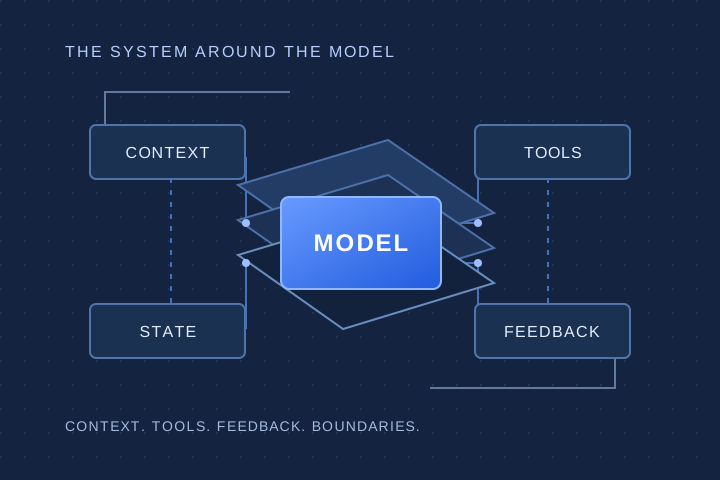
The better answer is to organize the work around clear boundaries: smaller changes, explicit requirements, tests tied to real behavior, failures you can see, and a clear definition of done. We covered that machinery in the system around the model.

This is where domain knowledge pays off. An accountant can spot a reconciliation rule that looks reasonable but is wrong. A civil engineer can catch a load assumption that breaks a calculation. A clinician can point out where a workflow creates an unsafe handoff.
Put that knowledge together with the ability to build, and smaller, more specialized teams start to make sense. It also makes engineers more valuable when they can turn a requirement into a system people can trust.
More software means more maintenance, not the old jobs back
When software is cheap to build, people build a lot more of it.
Some of it is throwaway. A script for a one-off conversion may never need another update. Other tools become dependencies almost by accident: a dashboard turns into the weekly reporting process, or a small internal app becomes the only record of an approval.
Someone has to look after those tools. Libraries get updated, access rules change, data formats drift, and the business runs into cases the original version didn’t handle.
So there’s likely a maintenance market, but its size depends on how many systems there are and how many paid hours each one needs. AI helps with maintenance too, and some apps will be replaced, retired, or merged.
It’s also not clear where that work will be done. We call this cheapshoring: looking for the lowest total cost of getting the work done, wherever that happens to be.
That cost includes wages, tools, coordination, reliability, security requirements, and how well people know the system. A lower hourly rate can be wiped out by expensive handoffs or rework. A small team close to the business may compete with a large supplier far away, and a specialist somewhere else may beat both.
Traditional offshoring destinations won’t necessarily stay the cheapest option. And neither location nor price says anything about engineering ability. Very capable people work everywhere.
The bigger question is how much outsourced work there will be at all. It could be a lot less.
A supplier could win a bigger share of a shrinking market and still employ fewer people.
A recovery could look very different
For engineering teams, the practical step is to measure the whole delivery cycle: which work actually got cheaper, which decisions are still scarce, and whether demand is growing fast enough to use the extra capacity. For software businesses, it’s understanding why customers keep paying when building a narrower alternative keeps getting easier. For individual engineers, domain knowledge, verification, and owning outcomes are the places to build value.
None of this depends on today’s AI companies surviving. After a crash, the tools, the open models, and the way people have learned to work with them would still be here. If demand recovers, it may bring different jobs rather than the old ones back.